How To Build a Center of Excellence Without Enterprise Resources
88% of automation initiatives fail to deliver results—not because the technology breaks, but because there's no system to sustain momentum. Learn how to build a CoE that turns successful pilots into scalable programs.
I’ve spent the better part of a decade watching automation projects die.
Not because the technology failed. The demos always work, and the pilots succeed. Then, six months later, the finance team is back in Excel, the operations lead is manually processing shipping documents, and the workflow you built is sitting unused in some forgotten corner of your tech stack.
If this sounds familiar, you’re not alone. And more importantly, it’s not your fault.
The automation industry has spent years selling a vision that doesn’t match reality for most businesses. Enterprise vendors show you org charts with 15 dedicated roles, governance committees, and three-year transformation roadmaps. They talk about “Centers of Excellence” as if you need to build a new department before you can stop keying invoice data manually.
That’s not how it works for a 200-person manufacturing company. Or a logistics firm running lean. Or a growing finance team that can barely keep up with month-end close, let alone stand up a formal automation program.
At Docxster, we work with these companies every day. We’ve seen what actually moves the needle, and we’ve seen what stalls out after the first win.
We wrote this ebook as a practical guide for companies of all sizes—because your organization’s size shouldn’t dictate your ambition to automate.
You’ll find:
Interviews with automation practitioners
A prioritization framework to choose workflows
A pipeline tracker to identify what to automate
Tons of tips on how to build a CoE realistically
The companies that figure this out save time—and that room (or folder) full of documents starts to feel a lot less overwhelming. Let’s build something that lasts.
— Ramzy Syed, Founder, Docxster
The graveyard of “successful automation pilots” keeps increasing
You’ve probably lived this story before.
Someone on your team identifies a painful process. Say, invoice matching that eats up two people’s entire morning, or shipping documents that sit in an inbox for hours before anyone touches them. The employee finds a tool and runs a successful proof of concept. They see real results, such as fewer errors and shorter processing times.
But six months later, the team is back to doing that same process manually.
The reason is that exceptions piled up because edge cases weren’t handled. And no one on the team has the technical chops to fix the problem.
Eventually, the workflows sit unused, and everyone moves on quietly.
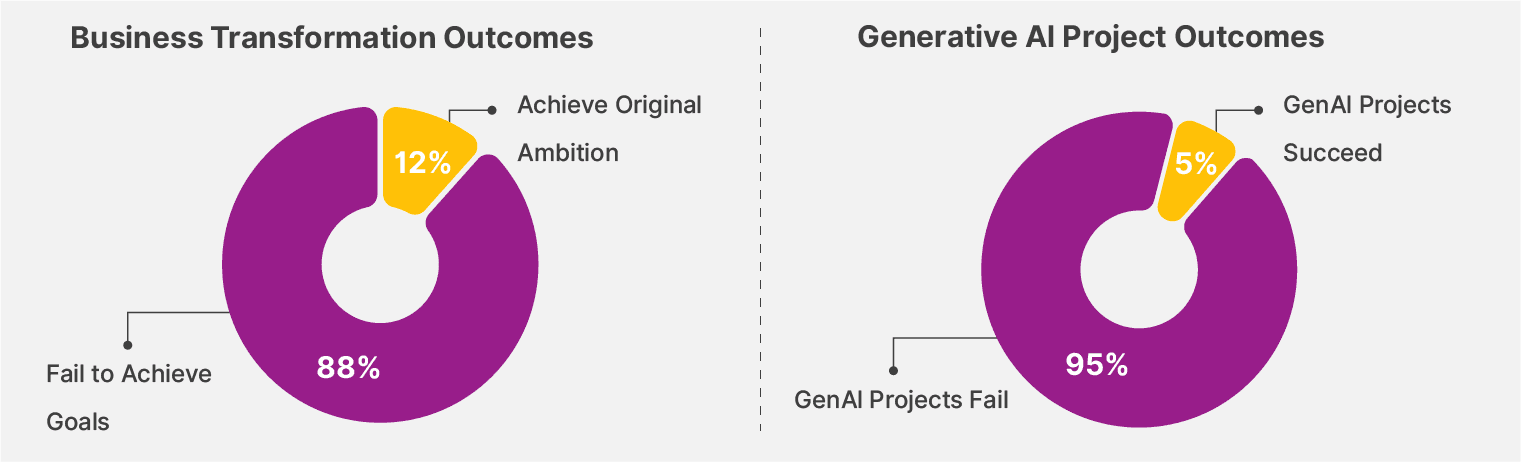
If this rings true, you’re not alone. A Bain & Company study found that 88% of business transformation projects fail to achieve their goals. This means only 12% achieve their original ambition, which is not a surprising number. In fact, when it comes to generative AI projects, a technology many companies rely on for automation, MIT found that 95% of these projects are failing.
The gap between “this works in a demo” and “this is how we operate now” is where most automation initiatives go to die. Here's why:
1. You’re automating a broken process
You can’t fix a workflow by making it faster. If your invoice approval process involves four people who all think someone else is responsible for exceptions, automating it just means exceptions pile up faster, with even less clarity about who owns them.
Symptom | What’s broken | Why it happens | What the CoE fixes |
|---|---|---|---|
Pilot worked, adoption didn’t | No owner for the initiative | Champion returns to day job | Named owner + feedback loop |
Exceptions pile up | The broken process was automated | Tribal knowledge is never documented | Process mapping before building |
Team double-checks everything | Trust never established | Success is defined as “hours saved” | Adoption + error metrics |
Team reverts to Excel | No escalation path | Issues feel risky to surface | Clear exception ownership |
Automation dies quietly | No roadmap beyond pilot | No prioritization system | Scoring + pipeline |
Priyatham Minnamareddy Director of Agentic AI at Novigo Solutions spent nine years building automation programs from scratch at Onity Group, where he’s spent nine years building automation programs from scratch. He has seen this pattern play out repeatedly:
“Often automation fails when you’re just trying to layer a digital transformation product on top of a process that’s already broken. That’s very counterproductive. First, document the process, then identify what can be optimized. What is the best way from A to B? And then you add the automation on top of it.”
It’s something even we’ve seen at Docxster. Our founder, Abdul Azeez (Ramzy Syed) learned early on that documentation has to come first. And not documentation of how the process is supposed to work, but how it actually works—including all the unofficial workarounds and tribal knowledge that live in people’s heads.
Here’s a recent project stuck with him. A chocolate manufacturer wanted to automate invoice categorization based on specific vendor codes. It sounded simple enough until he realized that the vendor codes weren’t stored anywhere we could actually access it.
Syed explains, “I asked to see the vendor codes. They [the manufacturer] said, ‘We have to write it down.’ When I asked why, they said it’s because it’s in our heads. There’s no database. There is no way to categorize that algorithmically. The knowledge lived only in the minds of the people who had been doing the work for years.”
The project couldn’t move forward. The information that made the process work had never been captured anywhere that a system could access it.
“I’ve watched businesses spend six figures on automation tools only to realize they’ve just made their inefficient workflows faster. Before we automated anything at Fulfill.com, we spent three months manually mapping and optimizing our processes. That groundwork saved us from expensive mistakes. The biggest mistake I see is treating automation as a technology project when it’s actually a change management project. Your technology can work perfectly, but if your team doesn’t trust it or understand it, the project fails."

Joe Spisak, CEO of Fulfill.com, has seen the same dynamic in logistics operations.
2. You don’t instate a clear owner
The person who championed the pilot usually has a day job. They squeezed in the automation work on top of their regular responsibilities and got it across the finish line.
Bain & Company’s study found that companies that allocated 50% or more of their resources to transformation initiatives achieved better results. When issues come up, nobody’s responsible for fixing them. The problems stack up, and eventually the team loses confidence.
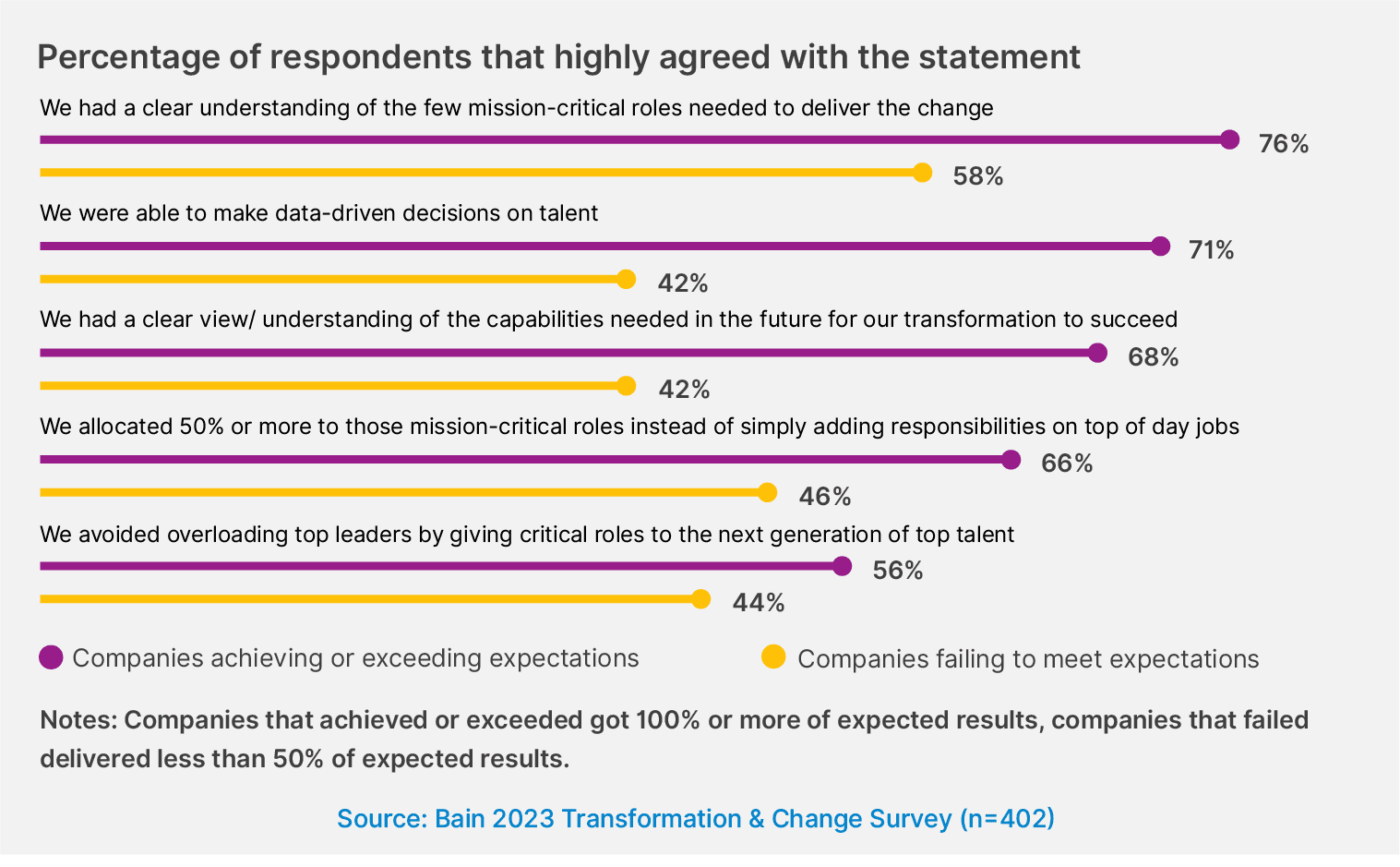
That’s why ownership can’t be an informal process. Your team’s already overwhelmed and overburdened with manual work, which is why they’re looking to automation to solve their problem. But if you don’t give them the tools or resources to make it happen, these pilots will fail.
3. You’ve defined success too narrowly
“Hours saved” is the metric everyone reaches for, and it makes sense on a slide deck. But it doesn’t capture:
Whether people actually use the automation
Whether they trust it
Whether they’ve stopped keeping manual backups
You can have an automation that theoretically saves 20 hours a week, while the team still spends 15 hours doing the work manually because they don’t trust the output.
“Companies move from pilot mode to business as usual when automation stops being treated like a side project and becomes part of the daily workflow. Apart from ownership, the turning point is visibility. Frontline managers need to see the time saved or the errors reduced. When those metrics show up in their dashboards, adoption jumps, and automation becomes routine. That’s the moment it stops being a pilot and becomes how the organization actually works.”

Teri Maltais, VP of Revenue at iTacit, has watched this play out across multiple organizations.
What’s an Automation Center of Excellence (CoE)?
When it comes to automation, a Center of Excellence (CoE) is a small group that owns two things: standards and momentum.
Standards mean everyone agrees on how documents get processed, how data gets extracted, and how exceptions get handled. Momentum means automation doesn’t stall after the first pilot. Someone is responsible for owning the automation initiative.
When enterprise vendors discuss CoEs, they make them sound overly complex. For example, they say you need multiple roles, governance committees, and maturity models to be successful. But all that leads to analysis paralysis.
“A Center of Excellence doesn’t have to be a team that you bring in externally or promote—basically, a team doing just automation activities. I’d start by identifying or being a champion myself to lead automations within my own organization. That itself is your COE—it does not have to be a full-time job. You don’t need a team to do this. You just need to dedicate two hours of your time in a week and build on that process.”

Abdul Azeez (Ramzy Syed), Founder, Docxster
Dimension | Enterprise CoE (the old way) | SMB / Mid-market CoE (the new way) |
|---|---|---|
Primary goal | Scale hundreds of automations | Make 1 automation stick, then expand |
Ownership | IT-led, centralized | Champion-led, business-owned |
Team size | 10–30 dedicated roles | 1–2 part-time champions |
Budget assumption | $100K–$1M+ annually | Existing headcount + lean tooling |
Timeline | 6–18 months to value | 30–90 days to first win |
Governance | Committees, stages, and audits | Lightweight intake + scoring |
Success metrics | Workflow count, maturity level | Adoption + expansion demand |
Points of failure | Bureaucracy slows progress | Champion burnout (if unsupported) |
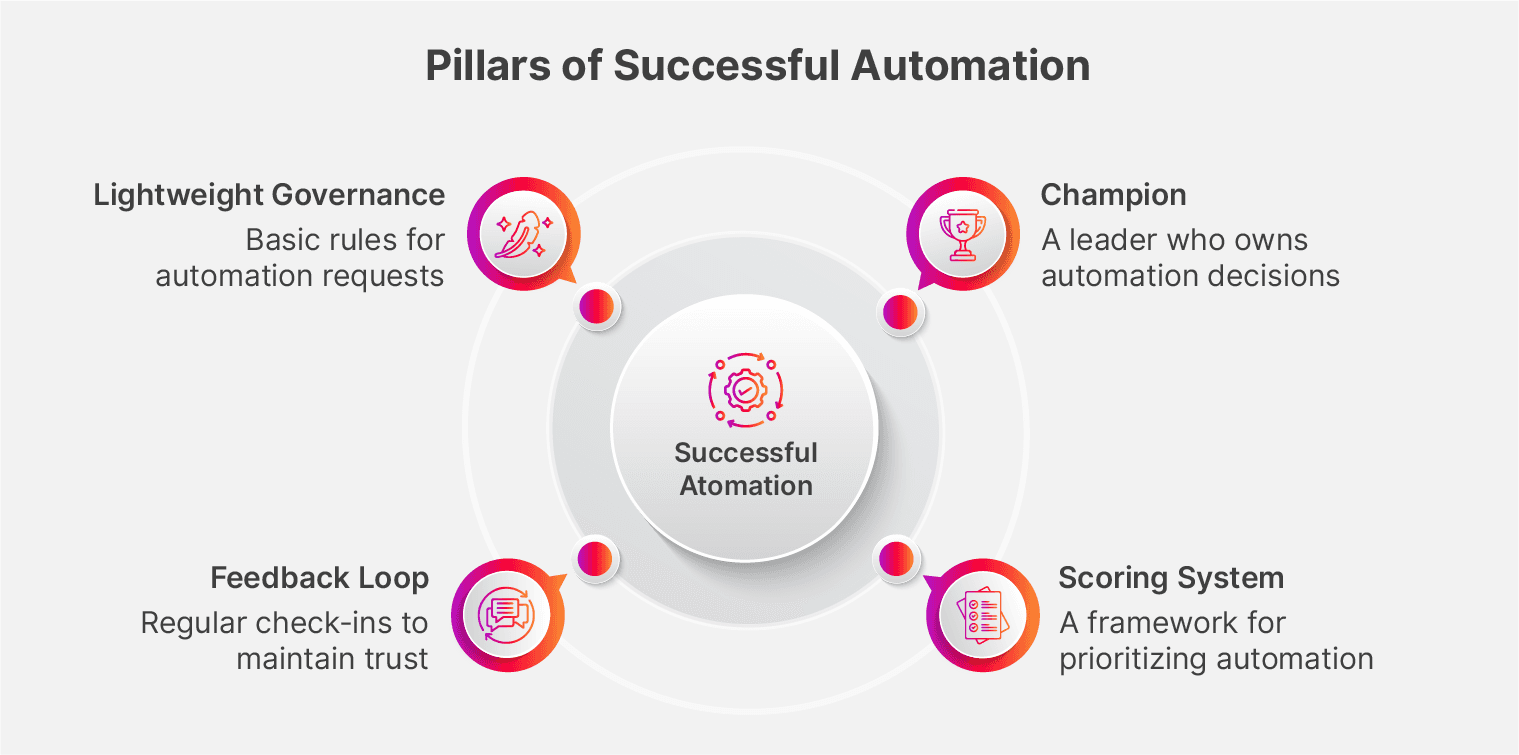
In reality, you just need four things:
1. A champion
This is where one person owns automation decisions. If you’re just starting, you don’t have to dedicate a full-time employee to this role.
Choose someone who
Has credibility with their peers
Is willing to talk to different teams to drum up workflow ideas
Is willing to commit 2 to 5 hours a week
2. A scoring system
A scoring system is a simple framework for evaluating which processes to automate first. It doesn’t need to be complicated—a spreadsheet with five or six weighted criteria works fine.
Here’s what we use:
Volume/transaction count
Frequency (daily/weekly/monthly)
Complexity (steps, systems, decision points)
Manual intervention percentage
Error/compliance cost (weighted highest because of risk)
Process maturity (documentation level)
Strategic alignment
Risk avoidance
Top-line revenue
Customer experience
3. A feedback loop
A feedback loop is a system that ensures the CoE meets regularly and that the champion reviews what’s working, what’s stalled, and what new opportunities have surfaced. This can be a 30-minute standup meeting every week or every other week with relevant stakeholders.
You need a system in place because, as you continue to receive feedback, you need a structured way to document and address it. If not, you won’t know what’s working and what’s not.
4. Lightweight governance
You need basic rules for how automation requests get submitted, evaluated, and tracked. It could be a shared spreadsheet or a simple form to understand what needs to be automated and why.
But it’s important to remember that governance only begins once you’ve successfully completed the pilot phase. When you begin building the CoE and automating the first few workflows, it’s best to select them manually. It’ll help you account for any nuances at a later stage when you’re scaling automation internally.
Who leads the CoE: IT or the business user?
Most automation experts we spoke with agree on two models: centralized and federated CoEs.
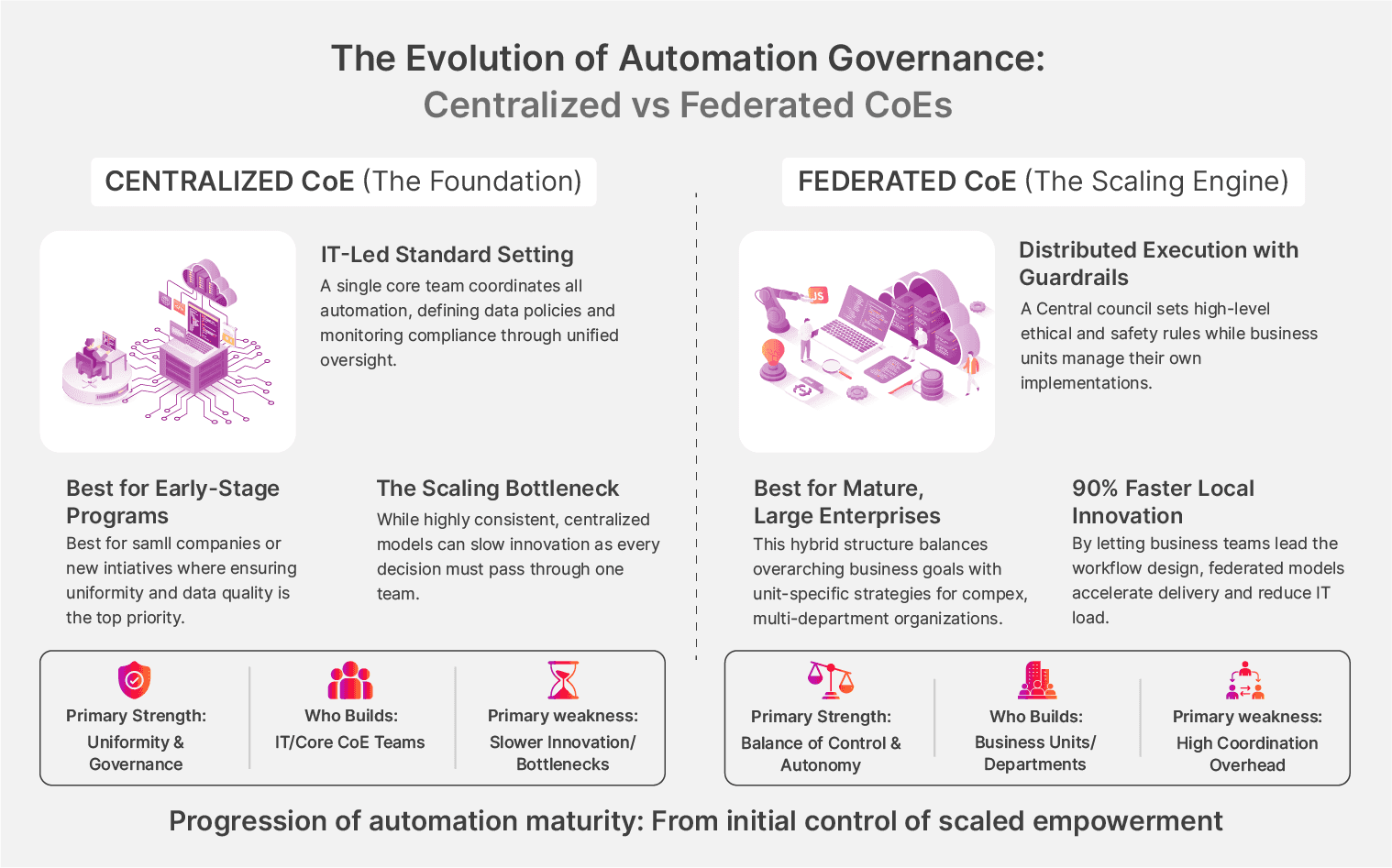
“Automation works best when IT and the business each own the part they’re built for. IT should lead on architecture, security, integrations, and making sure the automation is stable. But the business teams need to lead on the workflow itself, because they’re the ones who understand the pain points, the edge cases, and the real cost of errors.”

Teri Maltais
VP of Revenue, iTacit
But the tools have changed. With no-code automation platforms like Docxster, business users can build and modify their workflows themselves.
The people closest to broken processes understand them best. If your CoE doesn’t tap into that knowledge, your pilots won’t take off.
The best way to do this is to loop IT in and have them help you map out the processes and prioritize them. But prioritization and workflow design should be driven by the people who feel the pain every day.
Minnamareddy saw this dynamic play out at Onity Group. His team started with a centralized model in which IT controlled everything, then gradually shifted to a federated approach as departments gained confidence. In the federated CoE model, you can expect business users to take ownership of their workflows and experiment with automation.
“To begin with, the best way to start is to have a centralized CoE. But in the long term, we federated the CoE, where we let the business users automate the process, because once you automate the low-hanging fruit, business becomes very impatient.”
How to start building your COE
Now, you have to, you know, build the thing.
Here’s a 3-step process you can follow:
Step 1: Find your automation champion
The single most important decision you’ll make is who owns automation momentum in your organization. If you get this wrong, your entire initiative falls apart.
“What I see every time we automate document processing or data extraction is that resistance usually comes from two groups. You can spot early who will block automation by how they talk about exceptions. Champions focus on patterns. Blockers focus on why ‘our documents are different.”

Neil Webzell, CEO of Trafalgar Wireless
That’s why your champion-in-waiting needs specific traits. Look for characteristics like:
Credibility: People across departments trust their judgment and will follow their lead on new initiatives.
Empathy: They understand why people resist change and can work through objections without bulldozing.
Process depth: They know how work actually flows between teams, including the unofficial workarounds nobody talks about.
You might want to tap the most senior leader, but they likely won’t have the time to dedicate to this. On the other hand, technical experts tend to over-engineer solutions. Instead, focus on the mid-level process expert. They’re probably 3–5 years into their career with an excitement for automation-led process improvement. And they tend to have strong relationships (or influence) across departments.
Spisak learned this at Fulfill.com when building out their automation capabilities:
“The person who led this wasn’t our most senior engineer. She was a mid-level operations manager who spent two years manually processing these documents and knew exactly where the pain points were. That’s the profile you want—someone who feels the pain daily and has the credibility to rally others around the solution. The best champions can speak both languages—they understand the technical possibilities but obsess over business outcomes.”
Once you identify this person, give them the resources to make it happen. Don’t stack their workload. Instead, free up 10–20% of their time by redistributing their tasks. Frame it as an opportunity to fix the headaches they’re already facing. It’ll help you get buy-in and help them rally the project across their team or organization.
Tip: Typically, we see that there are three types of resistance when it comes to automation:
1. Fear of exposure: Some people worry that automation will reveal how messy their processes actually are. If they’ve been manually fixing broken invoices or reconciling data for years, they know where the bodies are buried. Automation initiatives highlight problems they’ve been quietly managing.
2.Fear of replacement: Others worry that automating their work will eliminate their jobs. This fear is usually overstated, but it’s real, and dismissing it doesn’t make it go away.
3. Fear of losing ownership: For a long time, your team has been handling things independently. When you try to automate their workflows, it can feel like an external party is interfering with activities that make no difference to the person “fixing” the problem. This is especially true if IT owns the entire CoE initiative—from pilot to full-scale implementation.
Account for this during the pilot to identify these perceptions and tackle them head-on during the pilot.
Step 2: Decide which document workflows to automate
You have a champion. Now you need to point them at the right problem. Start with the high-pain and high-volume workflows.
Your finance team processes 500 invoices a month. Your shipping department handles 50 exception reports. Which do you automate first?
Most people reach for volume. It looks impressive, and the math is easy to explain. But volume alone can be misleading.
That’s why we recommend using this scoring framework to consider the pains and gains:
Dimension | Weight | What to measure |
|---|---|---|
Error/risk cost | 25% | Compliance fines, rework costs, reputation damage. Include low-volume processes with high penalties. |
Time consumption | 20% | Hours spent per transaction × volume × frequency. The compound effect across your team. |
Scalability impact | 15% | Can this extend to other teams or processes? Reusability across departments. |
Implementation complexity | 10% | Number of steps, decision points, systems involved. Weighing this the lowest—a difficult automation that eliminates critical errors is still worth doing. |
Risk/compliance avoidance | 15% | Potential fines, audit exposure, and regulatory requirements. |
Top-line revenue impact | 10% | Does this process directly affect sales, renewals, or growth? |
Customer/vendor experience | 5% | Impact on borrowers, customers, or vendor relationships. Response times and error rates they see. |
Score each dimension on a scale of 1–10, and then calculate the weighted total:
Priority Score = (Volume_Score × 0.15) + (Time_Saved_Score × 0.20) + (Complexity_Inverse × 0.10) + (Manual_Intervention × 0.15) + (Error_Cost_Score × 0.25) + (Process_Maturity × 0.10) + (Strategic_Alignment × 0.05)
If the score is:
15+ priority score: Move forward
11–15 priority score: Review and refine
Below 11: Park for later
You should also keep in mind that some workflows just can’t or shouldn’t be automated. Here are a few scenarios where that’d be applicable:
Low volume but concrete processes: If you’re filing registrations occasionally or making custom contracts for high-value deals, it doesn’t make sense to fully automate the process.
Judgment heavy processes: Anything that requires heavy human judgment is better off being handled by a team member. For example, escalating customer tickets or early stage hiring. Similarly, if it takes only a fraction of a second to make a judgment, you’re better off just doing it manually as the gains will be miniscule.
High exception rates: During the pilot, if you notice that more than 40% of your tasks break the automation, it’s not a good candidate for the technology. You’d want to spend resources on the most automatable tasks, not the ones that have too many edge cases or ones that change too quickly.
But before scoring, confirm if the workflow process passes these three tests:
Can you document it in under 10 steps with clear if-then logic?
Does it involve structured data that follows consistent patterns?
Are there fewer than five decision points requiring human judgment?
If you can’t answer yes to all three, fix the workflow first and then score it.
Step 3: Map the process and layer in automation
You have a champion. You’ve picked a high-pain, automatable process. Now you need to execute in a way that builds trust in automation’s power.
Minnamareddy saw what happens when you don’t fix the process before automating it. When he was at Onity Group (formerly Ocwen Financial), business users would give his team the plain-vanilla workflows. But they never accounted for exceptions because they didn’t know they existed.
That’s why he recommends manually mapping the workflow or using a process discovery tool to monitor desktop activity and convert the steps into a process diagram.
Here’s a realistic timeline to finish these three steps in a 90-day sprint:
Weeks 1–2: Document the process as it actually happens. Identify your champion. Score 3–5 candidate processes using your framework.
Weeks 3–4: Select your pilot workflows and build the workflow. Define success metrics that go beyond hours saved.
Weeks 5–8: Run the automation pilot with a subset of transactions and note every exception that surfaces.
Weeks 9–12: Handle the exceptions and check the automation workflow again. Measure the process against your baseline metrics.
Only when that one workflow has been successfully automated do we recommend expanding. You can either solve for more broken processes within one department or pilot similar automations in other departments. The direction you choose depends on your end goals and resource availability.
Metric execs ask for | Why execs like it | Why it’s incomplete / risky | What it often misses | Better companion metric | Why the companion works |
|---|---|---|---|---|---|
Hours saved | Simple math, easy ROI story | Doesn’t equal usage or trust | People still double-check | % of transactions automated end-to-end | Shows real behavioral adoption |
Cost reduction | Budget-friendly, tangible | Lagging indicator | Savings vanish if adoption drops | Error cost avoided ($$$ / month) | Ties automation to risk + quality |
Workflow count | Signals “maturity” | Incentivizes sprawl | Redundant or unused automations | Workflow reuse rate | Shows standardization, not vanity |
ROI projection | Board-ready | Hypothetical early on | Ignores stabilization cost | Time-to-trust (days to no manual fallback) | Indicates when automation becomes real |
Processing speed | Feels operationally strong | Speed ≠ correctness | Faster errors scale damage | Exception rate over time | Shows whether automation is stabilizing |
Headcount avoided | Popular with leadership | Politically sensitive | Triggers fear, resistance | Work shifted to higher-value tasks | Reframes automation as enablement |
Automation coverage (%) | Feels comprehensive | Masks quality issues | Shallow automation | % straight-through processing (STP) | Measures true hands-off success |
IT tickets reduced | Signals efficiency | Doesn’t reflect business pain | Shadow work persists | Champion intervention rate | Shows ownership + process clarity |
Cycle time reduction | Ops-friendly | Averages hide edge cases | Painful outliers remain | P95 / worst-case cycle time | Highlights the exception handling value |
Compliance incidents | Risk-aligned | Rare, binary signal | Near-misses ignored | Near-miss / exception flag rate | Surfaces hidden exposure early |
User satisfaction (Survey) | Soft validation | Biased, inconsistent | People say yes, act no | Manual fallback frequency | Reveals true trust behavior |
Automation spend | Cost control | Ignores the value created | Penny-wise tradeoffs | Value delivered per workflow | Enables rational expansion decisions |
How to scale your CoE program after the pilot
When your first pilot works, two things happen: everyone suddenly has ideas on what to automate next, and you realize you need a governance structure to do this with guardrails in place.
Here are six principles to keep in mind to solve this issue:
Principle | What it means | How to apply it |
|---|---|---|
1. Crowdsource problems first | When people propose solutions, they anchor on a specific tool or approach. When they describe problems, you can evaluate whether automation is even the right answer. | Create a simple intake form with three fields:
Review submissions monthly, so people see movement. |
2. Ask the déjà vu question | The best automation candidates are tasks people do repeatedly without thinking. Muscle memory signals opportunity. | Ask teams: “What part of your job feels like déjà vu?” Limit submissions to one per person and require them to explain the business impact, not just annoyance. |
3. Build a lightweight governance structure | Sprawl starts when every team automates in isolation. You need just enough structure to prevent duplicate efforts and maintain quality. | Three things only:
|
4. Shift ownership to the frontline office | The turning point from “pilot” to “business as usual” is when ownership moves from the project team to the people doing the work every day. | Build documentation, training loops, and clear exception paths. The people running the process should own the data rules and maintenance—not just IT. |
5. Watch for the “It’s not working” feedback | The clearest sign that automation has truly landed is when people complain the moment it breaks. That means they depend on it. | If nobody notices when the automation goes down, it hasn’t become part of how your organization works yet. Keep iterating until it’s missed when it’s gone. |
6. Kickstart adoption through gamification | In some cases, you might see momentum naturally. But in our experience, you need to kickstart it to get the initiative going. That’s why you need to incentivize employees to take part in the initiative and adopt it in their daily processes. | You can create games to encourage business users to offer workflow ideas and automate them. For example, host a hackathon or “Automation sprint week” to ideate, run a pilot, and report on the results. Reward the outcomes through public recognition or tangible rewards like learning budgets or choice projects. |
The room full of documents is waiting. Are you ready to layer in automation to process them?
There’s always that one room or folder that exists in every manufacturing plant and logistics hub. It’s filled with documents where teams spend countless hours on manual processing instead of work that moves the business forward.
That room doesn’t have to stay the way it is.
The companies that figure out automation fundamentally change what their teams can focus on. But this shift doesn’t happen because someone bought a new tool. It happens because someone built a system to sustain momentum after the pilot ends.
That’s what a Center of Excellence really is.
You no longer need enterprise resources to do this successfully. You just need three things:
A process intake form to receive and evaluate automation requests
An opportunity tracker with weighted scoring to prioritize those frameworks
A document automation tool like Docxster to build these workflows in minutes
We’ve already given you everything you need.
The room full of paper isn’t going to empty itself. But it doesn’t have to stay full forever, either.
Have questions about building your CoE? Want to see how Docxster can help with document processing automation? Visit docxster.com or reach out to our team.
Start Your Automation CoE
Get the full guide PDF and the action tracker used in this article.